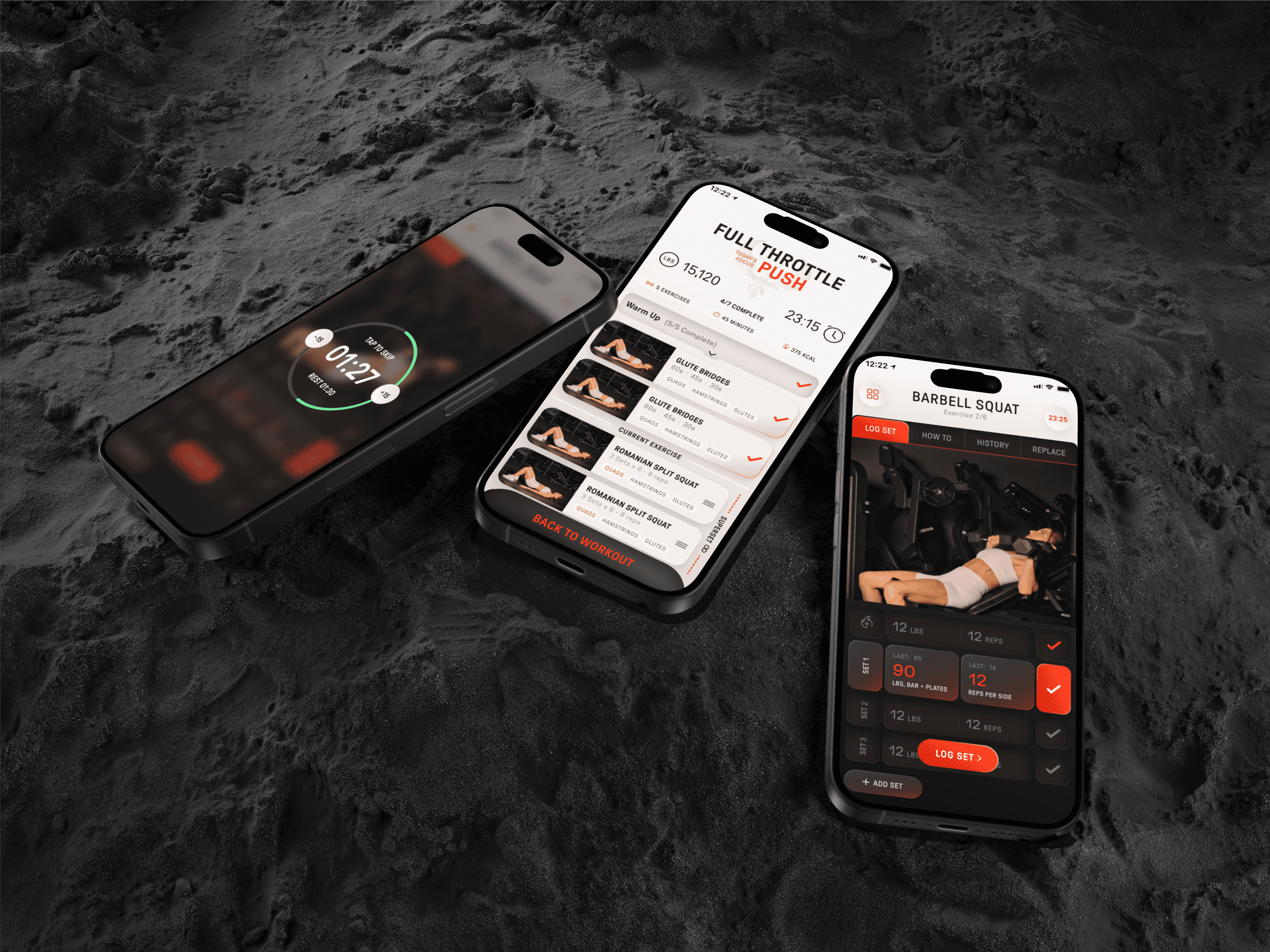
What Happens When a Gym Athlete Builds Her Own Fitness App
2026
Index
Built by a gym athlete who was tired of fitness apps getting in the way. This one doesn't.
Role
FOUNDING PRODUCT DESIGNER
Status
MVP in Development
Company
Ambrisa
Category
UX Design and Strategy
TL;DR
The Challenge
Fitness apps make you work before you work out. Rigid databases, toxic streaks, and 3 screens just to start a session. Lisa McPhearson, CEO of Ambrisa and a gym athlete herself, built this app because she lived the problem firsthand.
The Impact
Reduced the workout start flow from 3 clicks to 1. Invented Sport Mode — a feature absent from every major competitor. Designed AI as ambient infrastructure across the entire product, not just a chat feature.
My Output
100+ screens, an atomic design system, a branding pivot, and key features invented from real user research — all designed solo from ~20 inherited wireframes.
The Learning
Mastered auto-layout and atomic design systems end-to-end. Learned what it means to be a true founding designer, not just executing decisions but shaping them.
01 - The Problem
Fitness apps make you work before you work out.
Lisa McPhearson is the CEO of Ambrisa and a competitive gym athlete. She has cycled through every major fitness app on the market. Her frustration was not about missing features — it was that every app got in the way of the one thing users actually want to do: MOVE
After guerrilla research with real gym-goers between sets, the same theme kept coming up:
“I don't want to think before entering the gym. I just want to start.” - P2
“Let's say I played badminton today — it should just know what muscles I worked.” - P1
“Why do I have to go through three screens just to begin?” - P4
The problem was not a missing feature. The problem was FRICTION.
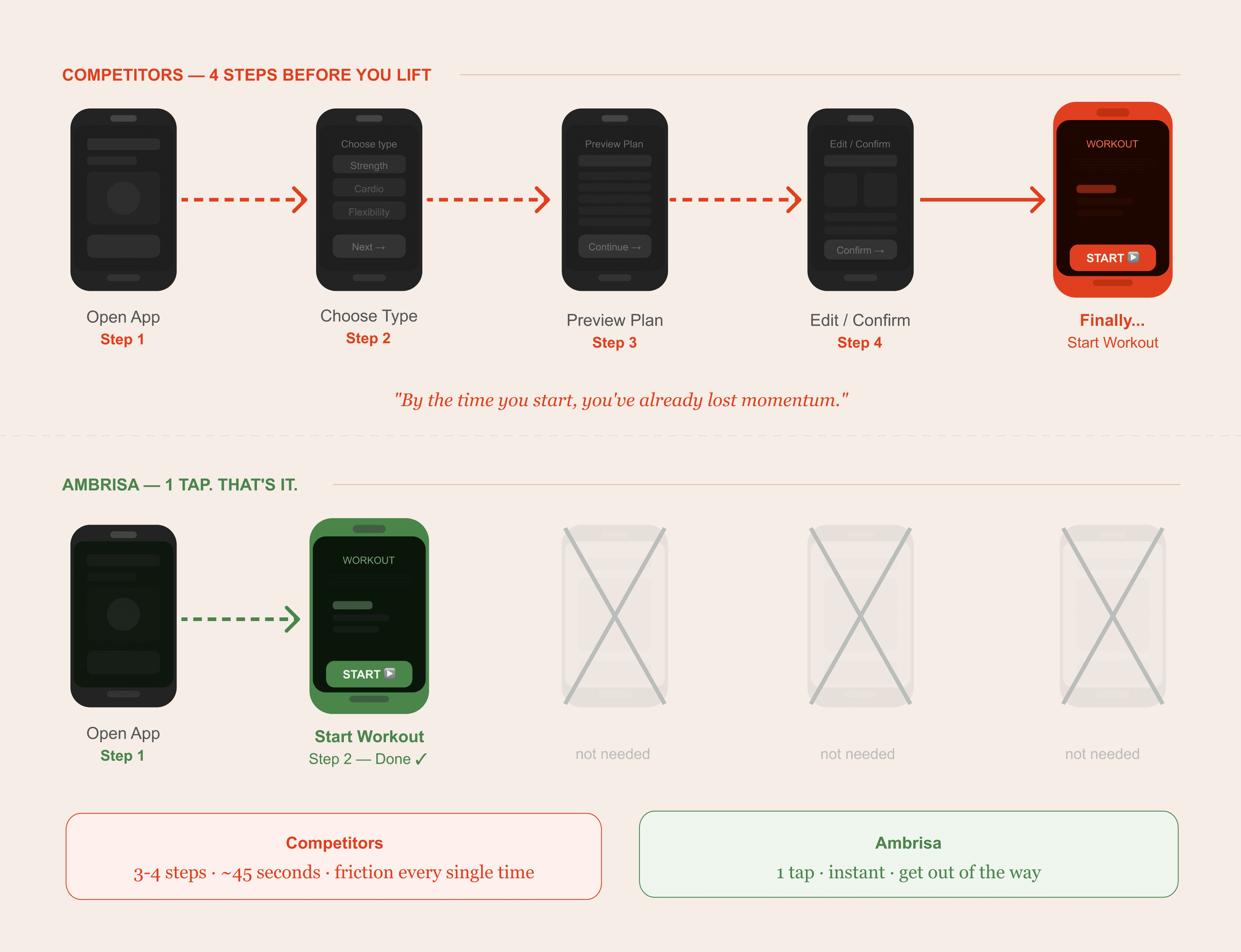
Every major fitness app like Gymverse, Fitbod, Evolve You, MyFitnessPal… required 2 to 3 screens before a user could start a workout. For someone walking into a gym ready to move, that is 3 screens too many.
02 - The Goals
With the problem clearly defined, we needed to align on what success looked like — both for the people using the app and for the business building it. These two sets of goals shaped every design decision that followed.
User Goals
What gym-goers actually needed from a fitness app:
Start a workout in one tap
Log any activity, not just gym exercises
Track nutrition without manual data entry
Feel supported, not judged or punished
Use AI that feels like a coach, not a robot
Business Goals
What Lisa and the team needed to ship and scale:
Ship a validated, investor-ready MVP fast
Move quickly into user testing phase
Build a design system that scales without chaos
Differentiate clearly from existing fitness apps
Drive organic user signups post-launch
03 — The Branding Pivot
Every section needed its own identity.
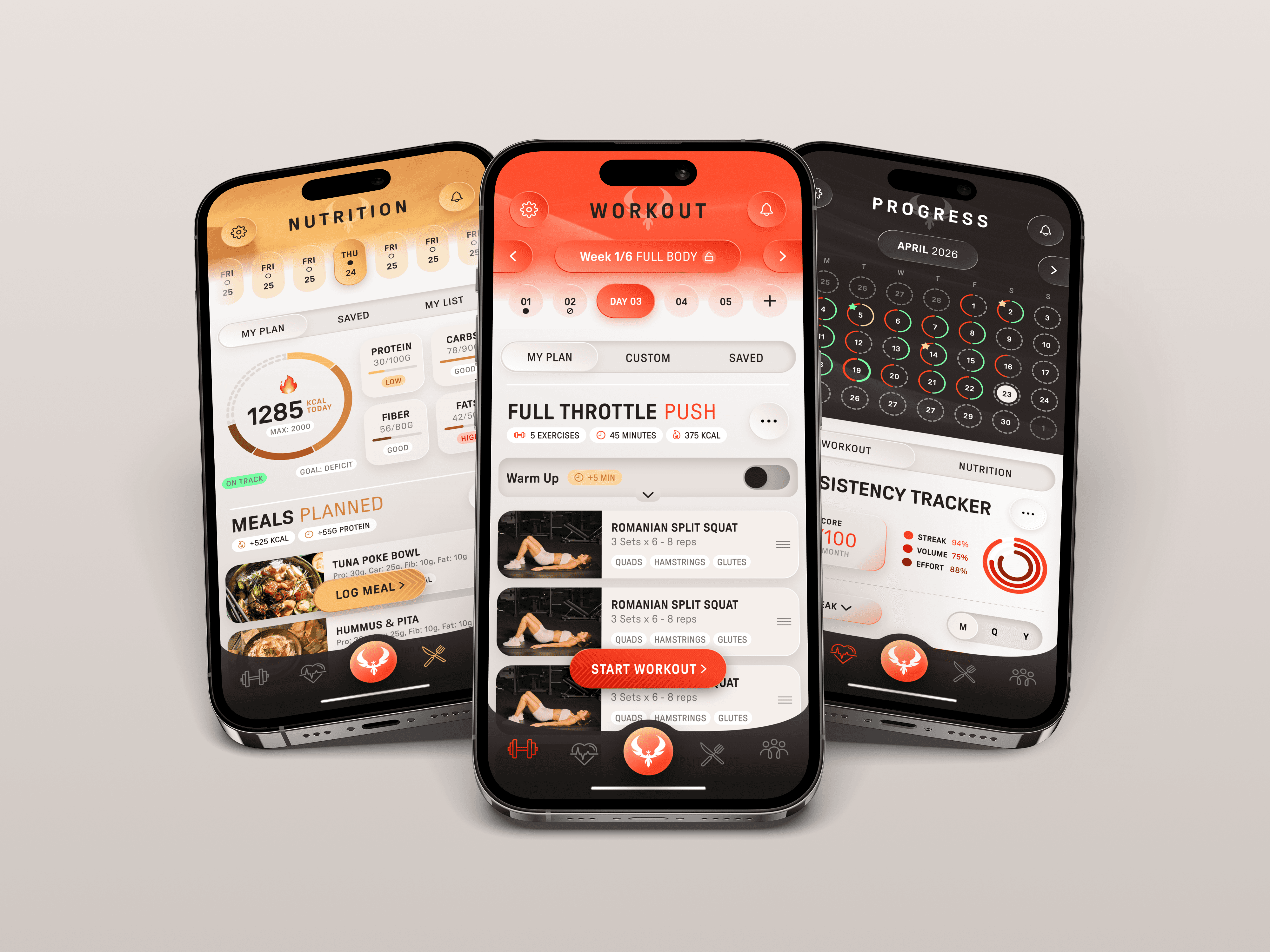
The original design direction was dark throughout — bold red/orange on black across Workout, Nutrition, and Progress. It looked strong. But something was off.
After collaborative review with Lisa (the CEO) and Creative Director Darren, we identified the core problem:
all three sections serve a completely different emotional purpose, but they felt identical. Workout is about energy and focus.
Nutrition is about nourishment and care.
Progress is about reflection and data.
The pivot gave each section its own visual identity:
The result was a product that felt like three coordinated experiences inside one app — each section instantly recognisable, none feeling generic.
04 — KEY DESIGN DECISIONS
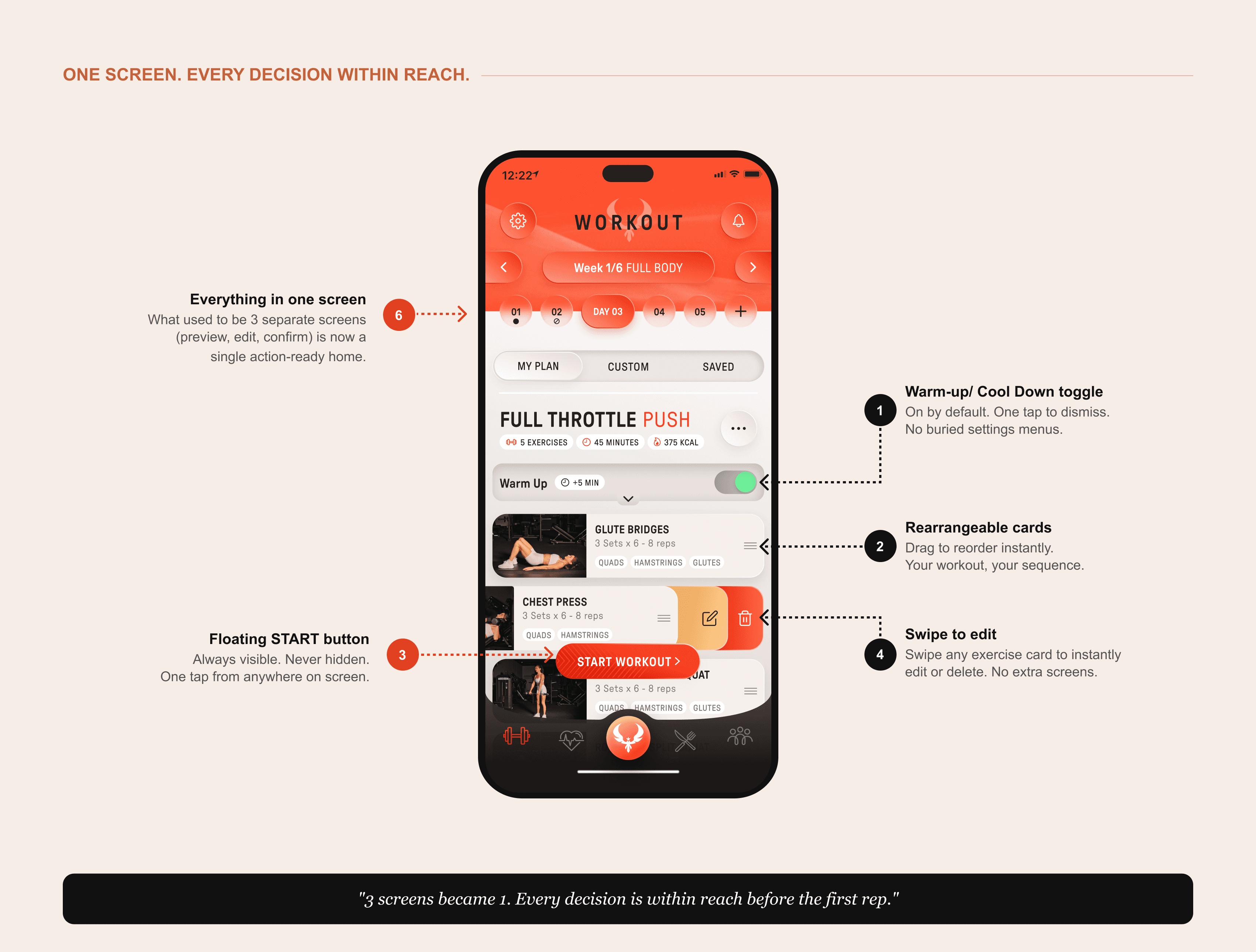
Decision 1: From 3 clicks to 1.
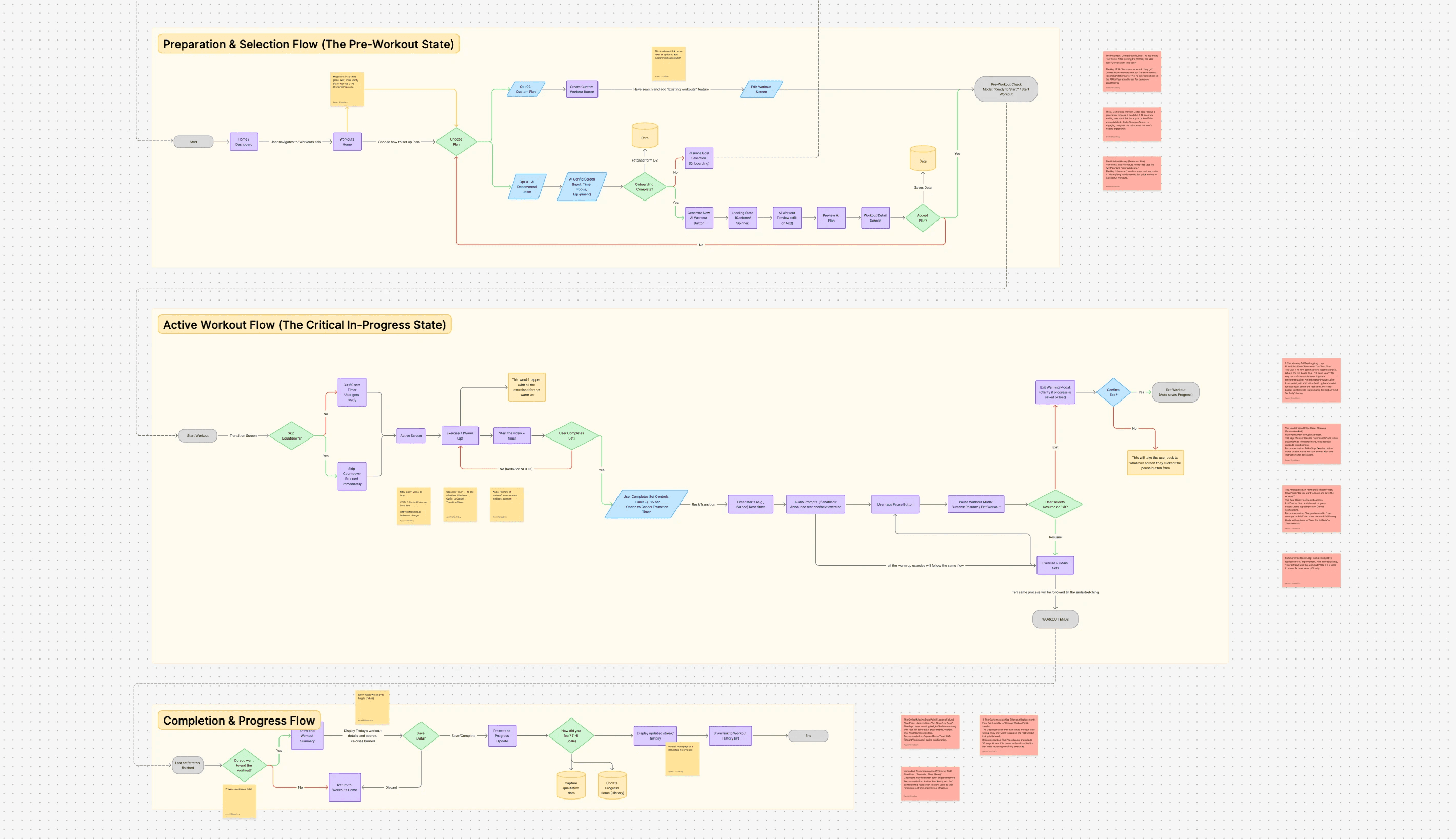
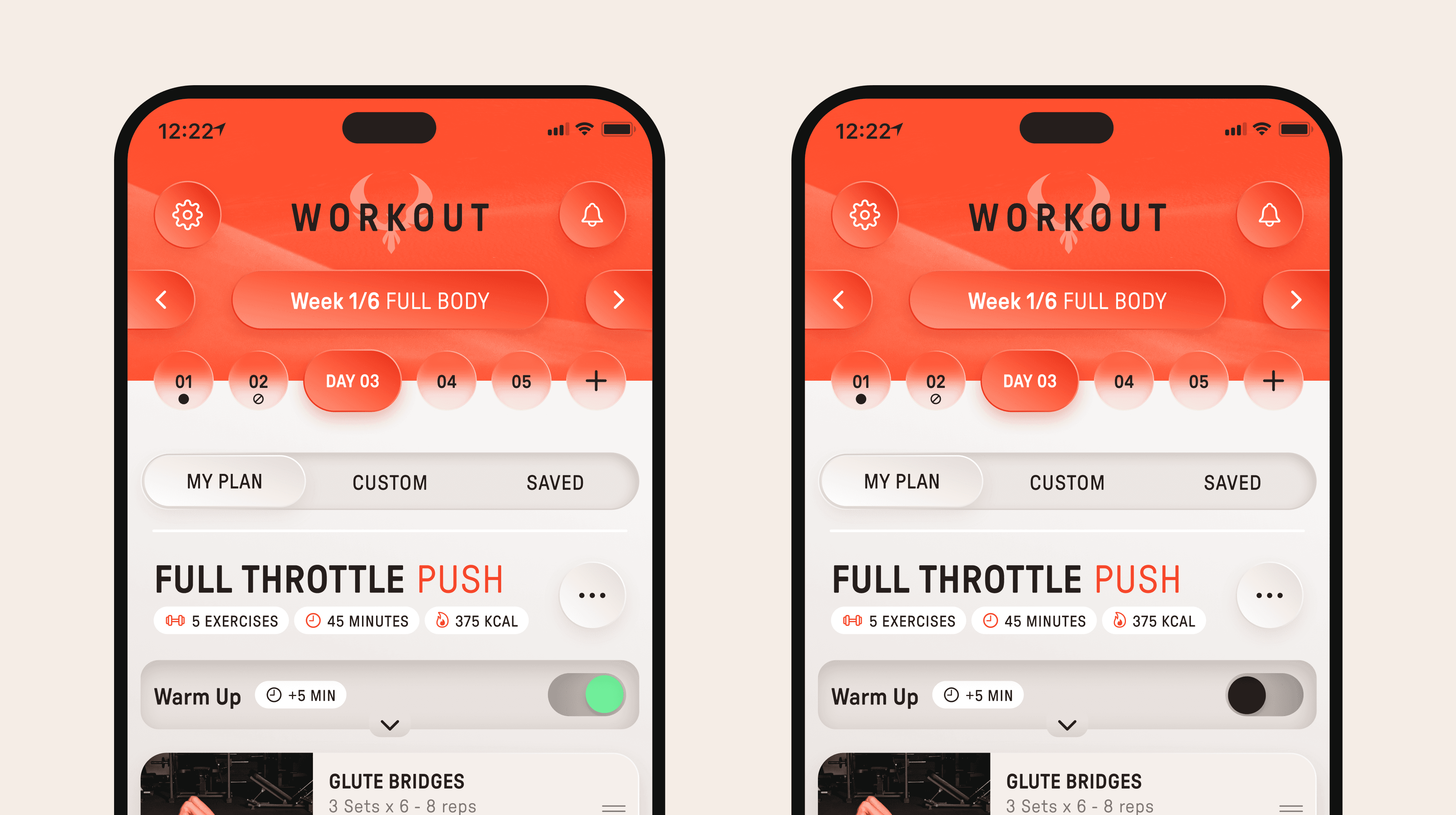
The original flow required users to navigate through a preview screen, then an edit screen, before finally reaching the workout. Three taps before a single rep. I combined all three states into one action-ready home screen — your plan, your options, and your start button, all visible immediately.
This single decision reduced the core start flow by 66% and directly addressed the number one friction point found in user research.
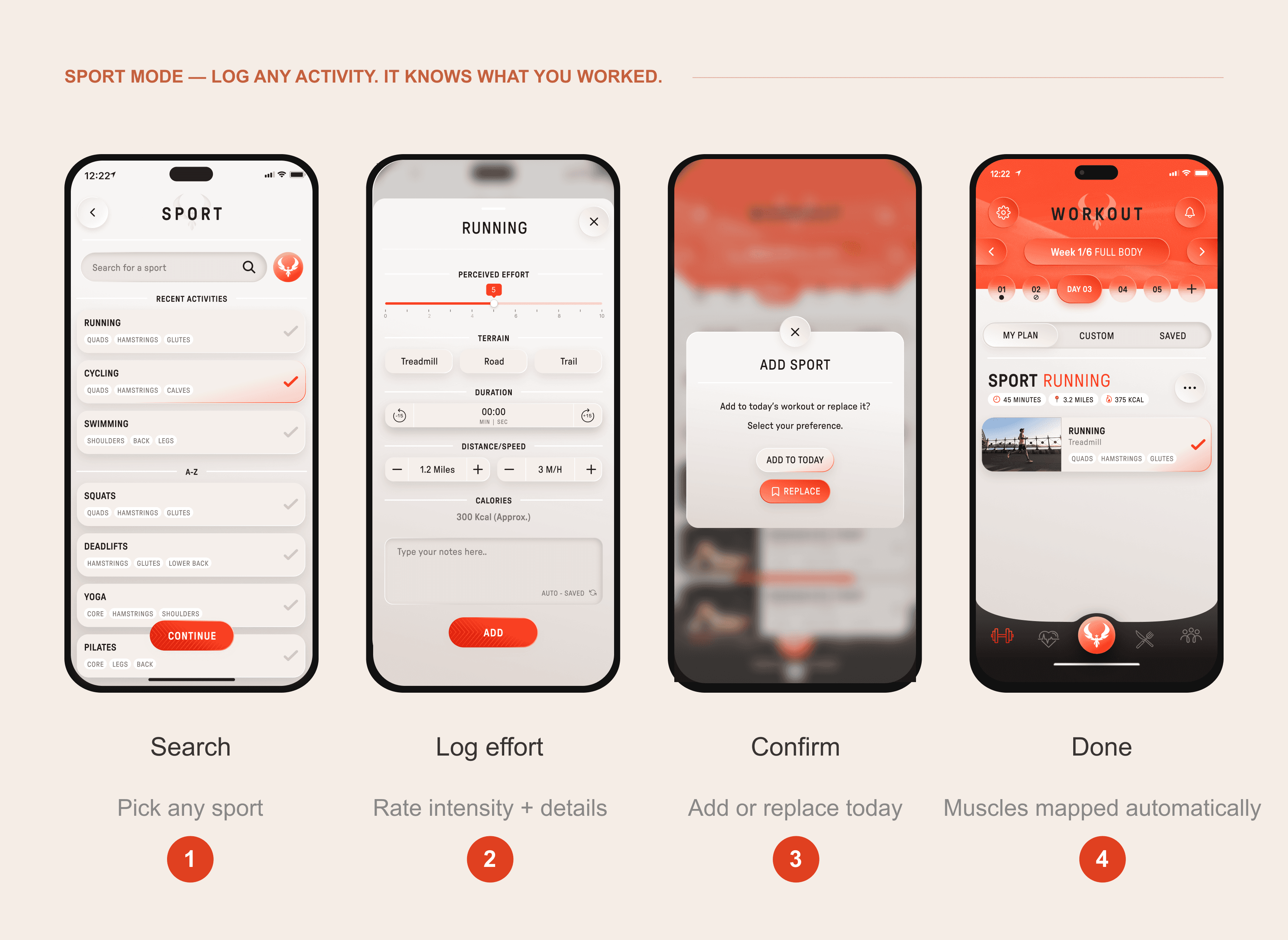
Decision 2: Sport Mode.
During gym-floor research, one quote stopped everything:
“Let's say I played badminton today — it should show what muscles I worked.”
No competitor offered this. Not one of the 8 apps we analysed. Sport Mode lets users log any sport and automatically maps it to the muscle groups worked — turning casual activity into meaningful fitness data. One conversation with a real user became a core product feature.
Decision 3: AI as infrastructure, not a feature.
Most fitness apps bolt on an AI chat and call it smart. We designed AI into the fabric of the entire product so it feels like it was always there.
Two features show this best:
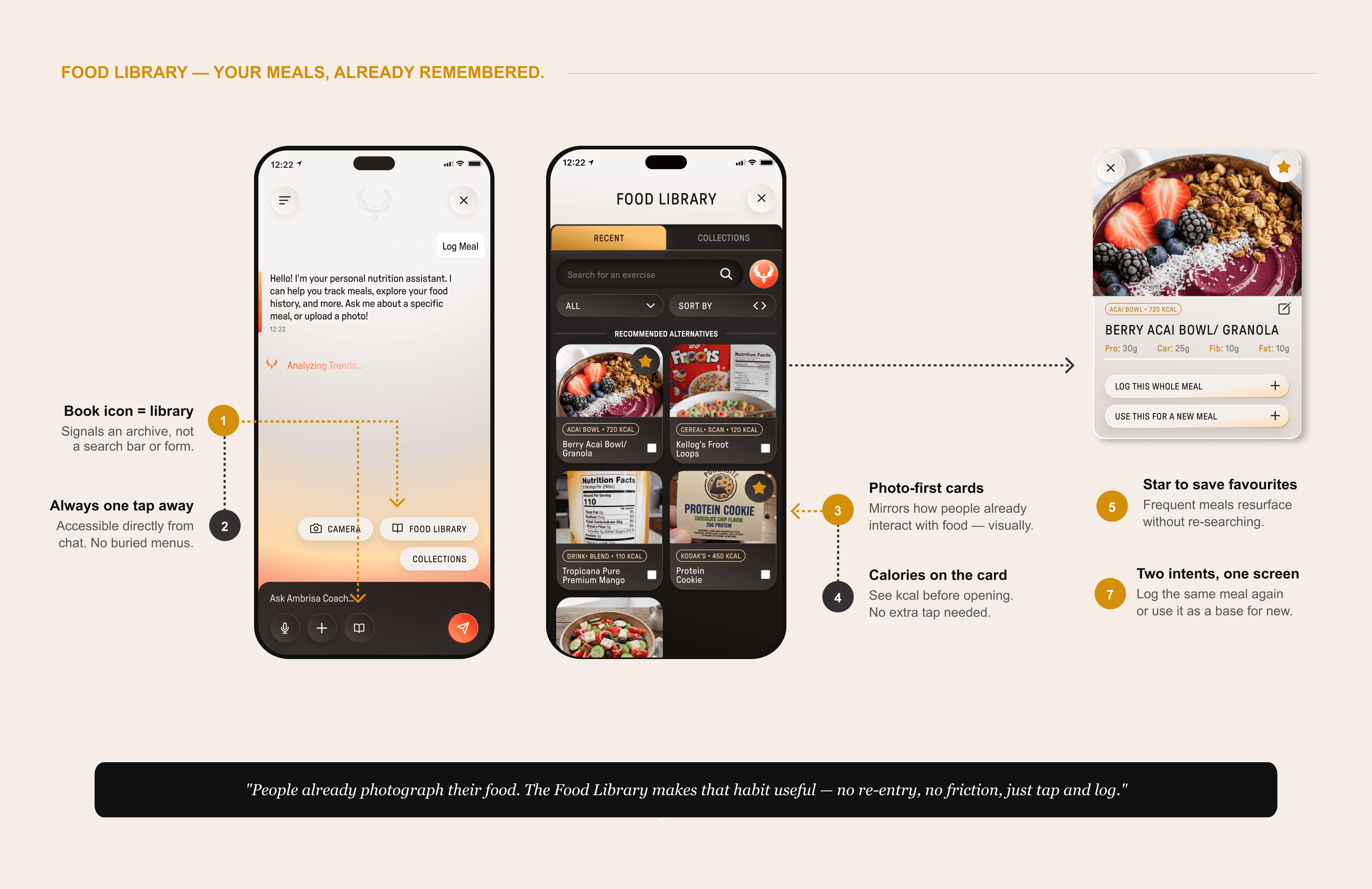
The Food Library
People already photograph their meals. It is one of the most consistent food-related behaviours we observed — users snap a photo before they eat, every time. The Food Library turns that existing habit into a productivity tool.
Inside the AI Coach in the nutrition section, there is a toggle that opens the Food Library — a personal archive of every meal photo or screenshot the user has ever uploaded. Each entry is automatically tagged with macros and nutritional information. So instead of re-logging the same chicken and rice bowl for the tenth time, the user just pulls it from their library and taps.
The insight behind it: logging food is not hard because people do not know what they ate. It is hard because the apps make them prove it from scratch every single time. The Food Library removes that friction by building on what users are already doing naturally.
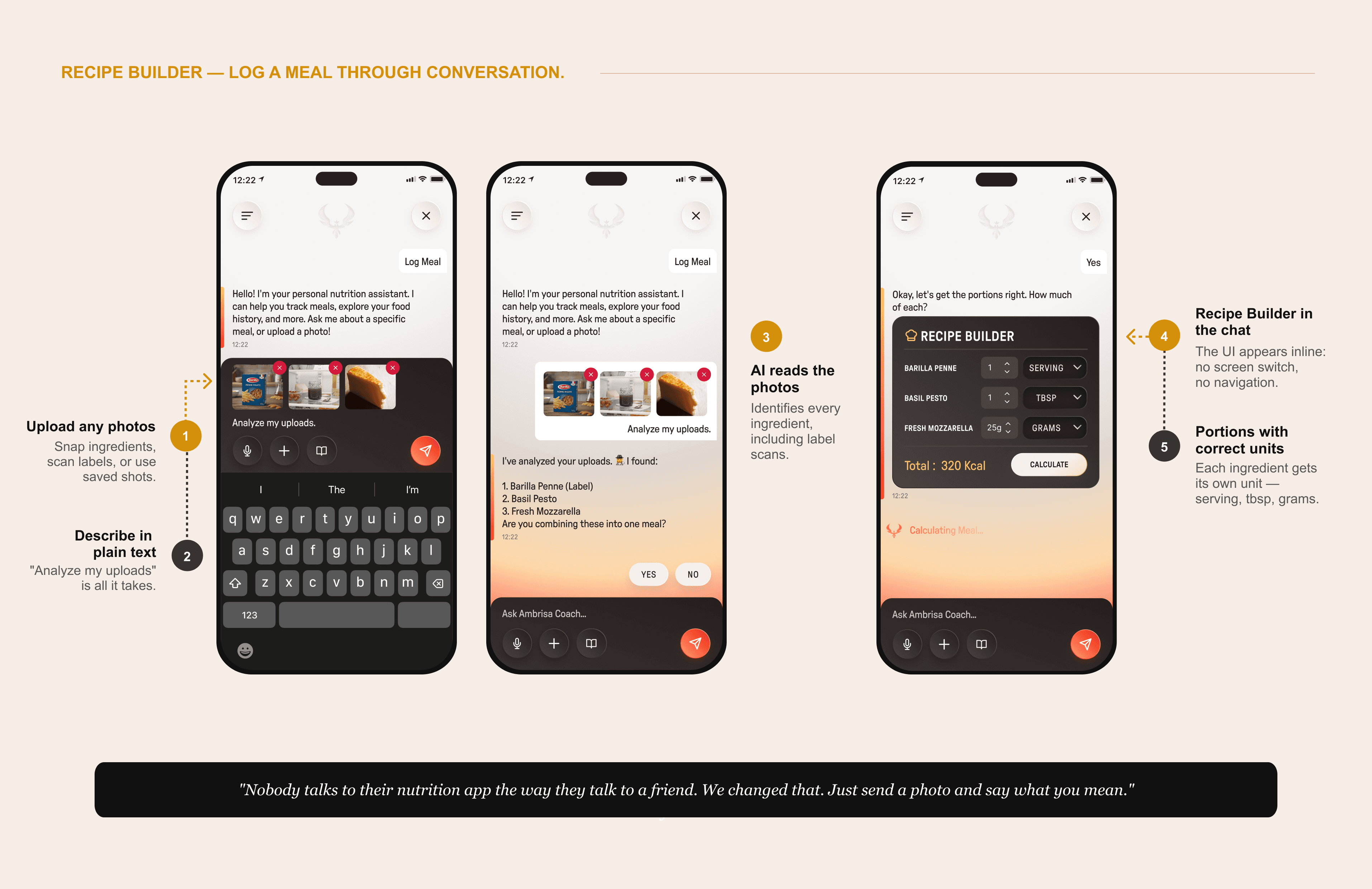
The Recipe Builder
This one came from a simple observation: the way people talk about food with friends is nothing like the way apps ask you to log it. Friends say 'I made pasta with tomato sauce and some leftover chicken.' Apps say 'Select item. Enter serving size. Add macro.'
The Recipe Builder lives inside the AI Coach chat. Users describe a meal in conversation — exactly how they'd tell a friend — and the AI builds the recipe, calculates the macros, and saves it to their library. No forms. No frustrating inputs. Just a conversation that ends with a logged meal.
This is the kind of design decision that does not just improve usability — it changes how someone feels about tracking their food. That is added value, not just added screens.
The full AI surface across the product:
Workout search: understands natural language, not just keywords
AI Coach chat: conversational interface for food logging and guidance
Food Library: AI-powered discovery replacing static database search
Recipe Builder: build and log meals through conversation
Progress Insights: AI surfaces patterns the user has not noticed yet
Decision 4: Warm-up and Cool-down toggles.
Here is the problem: some gym-goers always warm up. Some never do. An app that forces a warm-up on everyone is annoying. An app that hides it in settings means the people who need it never find it.
The solution is simple: warm-up and cool-down are toggled ON by default so every user has them without needing to configure anything. But they are dismissible in a single tap — no buried settings, no confirmation dialogs, no friction. Users who want them keep them. Users who do not, remove them instantly.
It sounds small. But this kind of decision — respecting two very different users simultaneously without asking either to compromise — is what separates good product design from good visual design.
05 — THE DESIGN SYSTEM
100+ screens. One designer. Zero chaos.
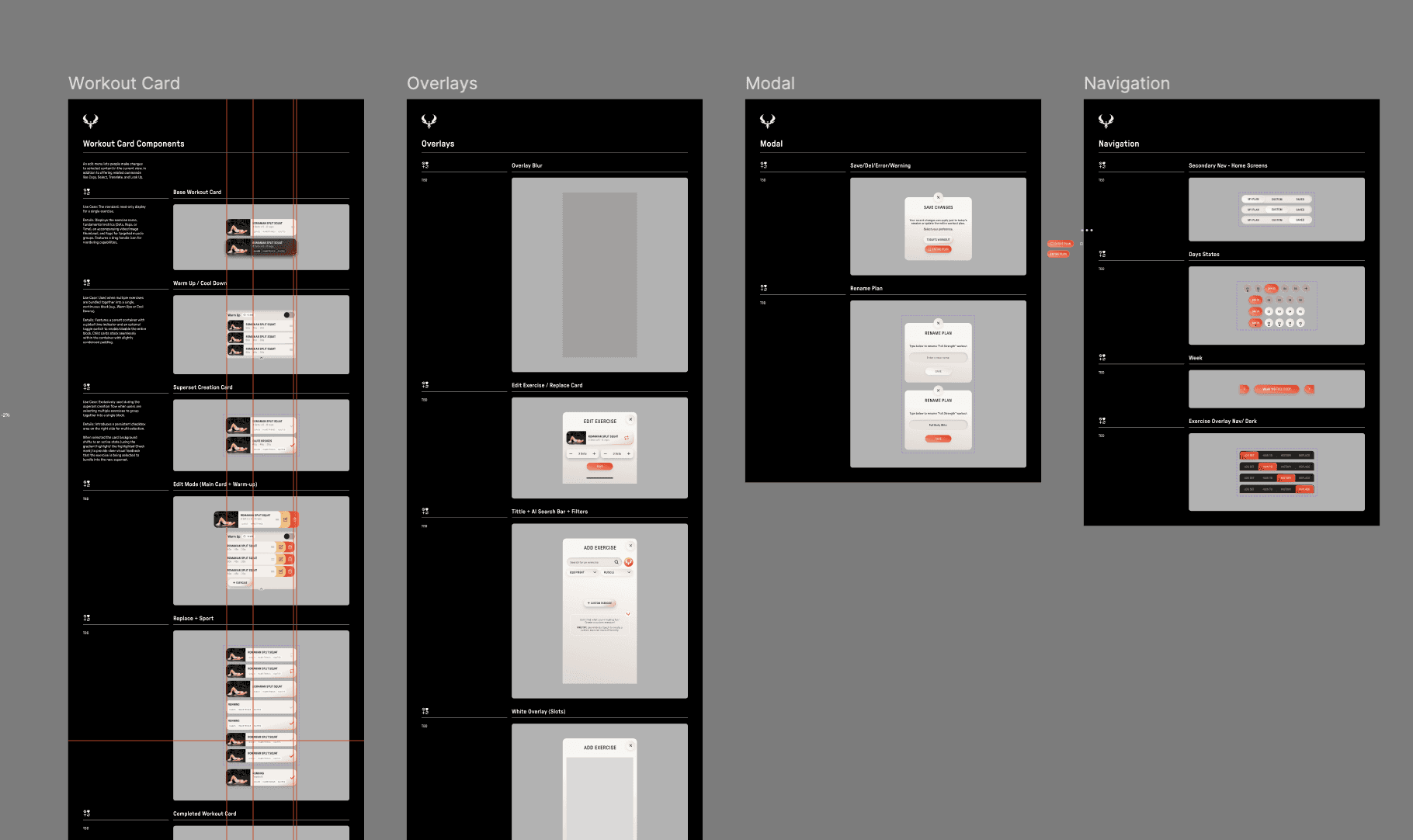
I inherited approximately 20 wireframes from a previous UI designer. They had no documented system, no component library, and no clear rationale behind the decisions. I built the entire design system from scratch, alone.
The system is atomic: base tokens feed into components, components feed into templates, templates feed into screens. Every spacing value, color, and component variant is defined as a Figma variable so the system can scale without inconsistency.
This project is also where I truly mastered auto-layout. Not just used it — understood it deeply enough to build complex responsive components that hold their structure across every screen size and state.
Component library: buttons, cards, inputs, nav, modals, overlays
Color variables: per-section theming with a shared brand token layer
Typography system: scale, weight, and line-height defined for every use case
Weekly engineering handoffs: every component annotated and export-ready
06 — OUTCOME & REFLECTION
What I shipped.
100+Screens designed 3 → 1Clicks to start a workout | 8Competitor apps researched 1Designer. The entire product. |
What I learned
This was the project where I stopped being a designer who executes and became one who shapes.
I pushed back on the original branding direction with a reason. I invented a feature, Sport Mode: because I was listening closely enough to hear what was missing. I built a design system not because I was asked to, but because I knew the product needed one to survive.
The biggest technical growth was auto-layout. I went from knowing it to owning it.. building components complex enough that engineers could hand them off directly without rework.
The product is still in development. But the foundation is solid, the system is scalable, and every decision has a reason behind it.